Booking software for car detailers

Run your detailing business at race pace.

One booking page for your customers. One app on your phone for every job, client and day. No website needed, set up in minutes.

Built by a working detailer who uses it every day.

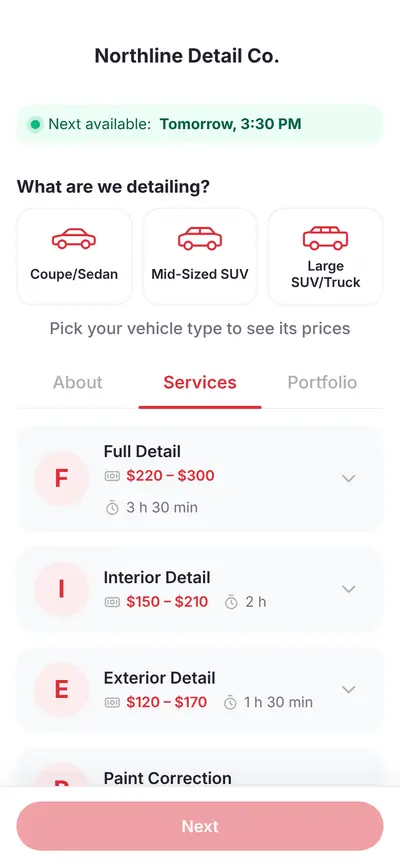
Customer booking page with vehicle types and service prices
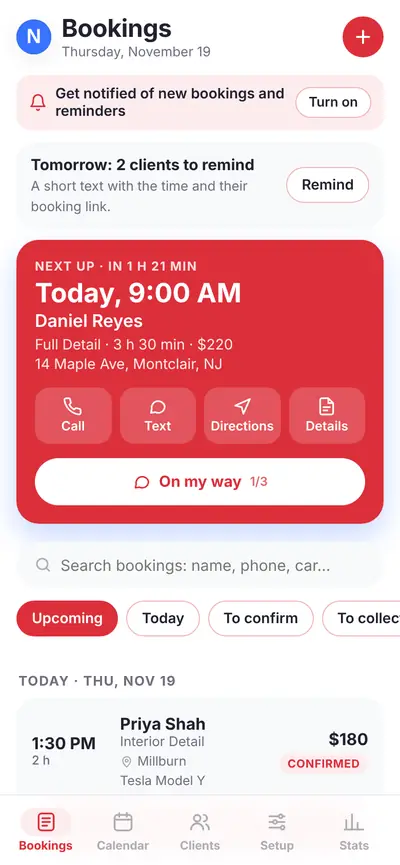
Owner app showing the next job and today's bookings
Booking page24/7.
Double-bookings0.
Vehicle sizes priced3+
Cost during early access$0.
How a booking flows

From first tap to finished car

Real screens from the app, shown with sample data. This is exactly what you and your customers get.

01

Customer books online

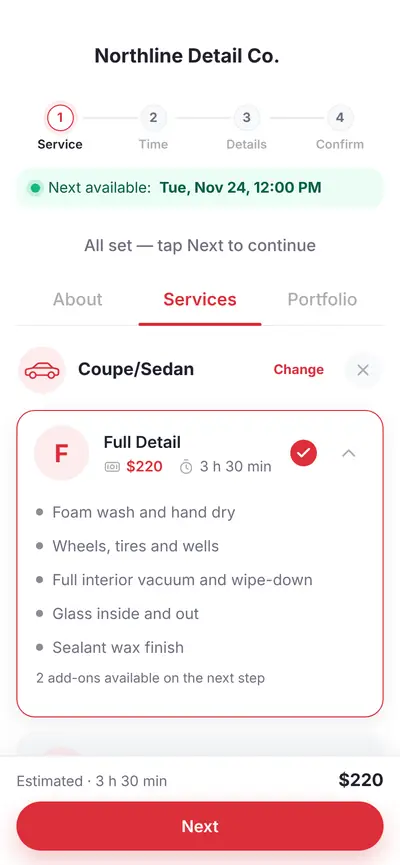
They pick their vehicle size, see the exact price, choose a service and add-ons, then grab a time you actually have open.

  • Prices change by vehicle size
  • Add-ons like pet hair or seat shampoo
  • Only your open hours can be booked
Booking page: choose a vehicle type
Booking page: a service selected with its price and time
02

You see it instantly

Your next job sits at the top with the client, car, price and address. Call, text, get directions or tap "On my way" without leaving the screen.

  • Notifications when someone books
  • One tap to message the client
  • See what is confirmed and what is unpaid
Owner app: next job and today's list
03

Plan the day, then drive it

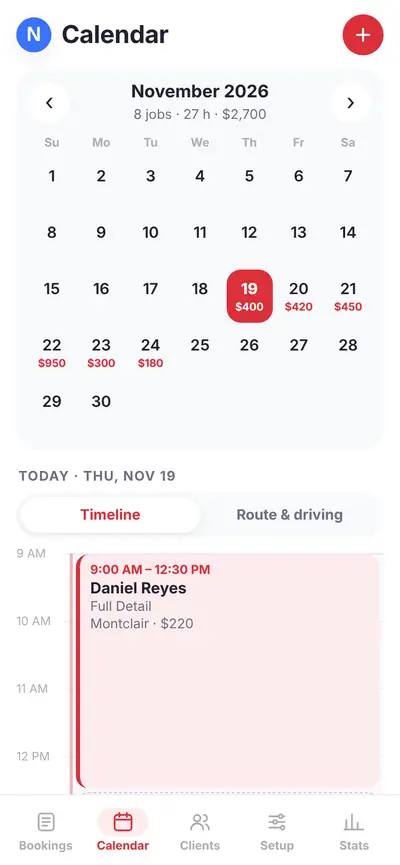
A calendar with your jobs and earnings for each day, plus a timeline so you can see gaps and tight turnarounds before they happen.

  • Month view with booked revenue per day
  • Timeline and route view for the day
  • Overlaps are blocked for you
Owner app calendar with daily totals and a timeline
04

Keep them coming back

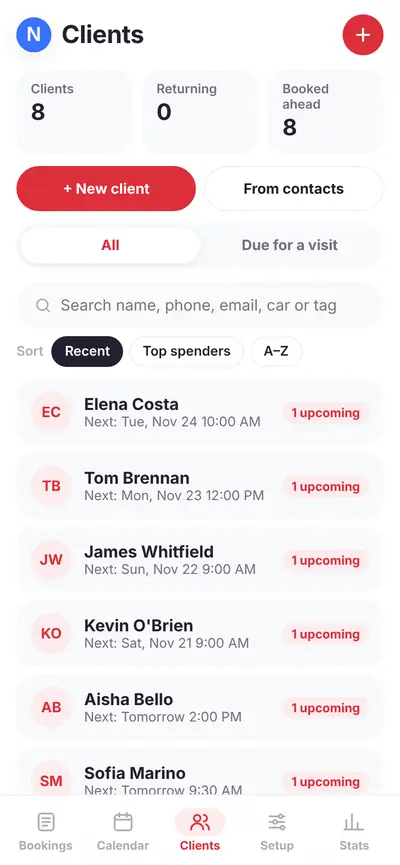
Every customer and every car in one list, with their upcoming jobs. Sort by who spends most or who is due for a visit, then reach out.

  • Booking history for each client
  • Search by name, phone, car or tag
  • Tap Remind to text tomorrow's clients
Owner app client list
The spec sheet

Everything you need. Nothing you don't.

The tools a detailer actually uses, without the clutter.

01

Your booking page

Your name, logo and services on a clean page. Share the link on Instagram, Google and your business card.

02

Prices by size

Set a price and time for sedans, SUVs and trucks. Customers see the right price as they pick their car.

03

Add-ons

Offer extras like clay bar or pet hair removal, and group services the way your customers think about them.

04

Mobile or shop

Work at the customer's address or at your shop. Add a travel fee by distance when you drive to them.

05

Hours and days off

Set your weekly hours and block off days. Customers can only book times you really have.

06

Works like an app

Add it to your home screen, get notified on new bookings and get a reminder before each job.

07

One-off pricing

Someone calls and you quote a special price? Make a custom service when you add the booking, without touching your menu.

08

Customers can move it

Every booking has its own link where the customer can reschedule or cancel, so there is no phone tag.
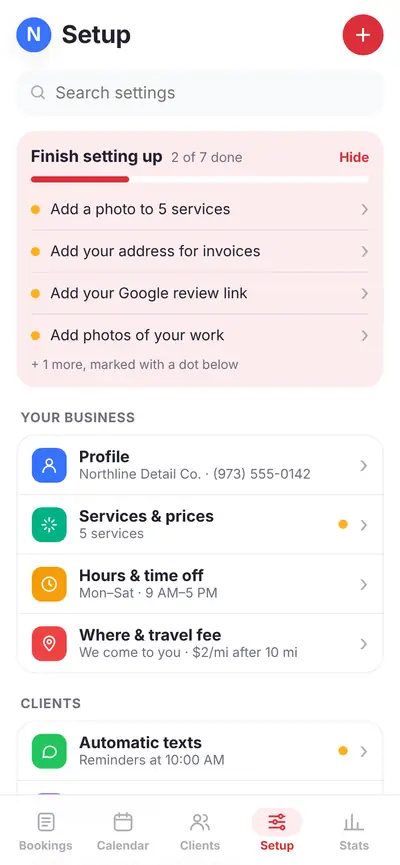
Owner app setup screen with a checklist
Make it yours

Set up in an afternoon, not a month

A guided checklist walks you through the setup. Your page updates as you go, in your name and with your logo.

Upload your logo
Pick your time zone
Add services and prices
Set hours and days off
Choose travel fees
Add photos of your work
Lights out

Three steps to your first booking

No developer, no website, no setup call.

P1

Create your account

Pick your business name and booking address. It takes a minute.

P2

Add your services

Enter your services, prices, hours and logo. Your page updates as you go.

P3

Share your link

Put it on Instagram, Google and your signage. Bookings land on your phone.

Early access

Get on the grid before everyone else.

We're opening to a small group of detailers first and listening closely to what they need. Early-access detailers use it free while we finish launch.

Early access

  • Free during early access
  • Your own booking page in minutes
  • Direct line to the person who built it
Get started
Pit wall

Questions

Do I need a website?

No. Your booking page works on its own and you can link to it from anywhere. If you already have a website, add the link to a Book Now button.

Does it work for mobile detailers and shops?

Both. Set whether you work at the customer's address, at your shop, or either, and add a travel fee if you drive to them.

Can my customers change or cancel a booking?

Yes. Every booking has its own link where the customer can move or cancel it, so you don't have to play phone tag.

Is it an app I have to download?

It runs in your browser and installs to your phone's home screen like an app, with notifications. There's nothing to download from an app store.

Who built this?

A working detailer. It started as the booking system for a luxury detailing business, and it's now available to other detailers.